|
|
|
|
|
| Last published: 29 July 2004 | Doc for 0.1.0 |

|
About this TutorialThis tutorial will illustrate how to create the most simplistic networkable "game" using the GameFramework. I put game in quotes because this example is not really a game since it does nothing but enable the players to chat. But this is a good starting point. The Chat GameThis tutorial takes advantage of the class net.mlw.gfw.client.DefaultClient . This abstract class can be used as a starting point for a swing client interface. Below is an an implementation of a game that extends net.mlw.gfw.client.DefaultClient . And below the source is an explanation of what is going on.
 1: import javax.swing.JFrame;
 2: import javax.swing.JMenu;
 3: import javax.swing.JMenuBar;
 4: import javax.swing.JMenuItem;
 5: import javax.swing.JPopupMenu;
 6:
 7: import net.mlw.gfw.client.ClientContext;
 8: import net.mlw.gfw.client.DefaultClient;
 9: import net.mlw.gfw.ext.basic.action.NewGameActionListener;
10: import net.mlw.gfw.server.impl.DefaultServer;
11:
12: public class Main extends DefaultClient
13: {
14:    protected final JMenuBar  menuBar         = new JMenuBar();
15:    protected final JMenu     menuGame        = menuBar.add(new JMenu("Game"));
16:    protected final JMenuItem menuFileNewGame = menuGame.add(new JMenuItem("New Game"));
17:
18:    public final void init(final ClientContext clientContext)
19:    {
20:      setJMenuBar(menuBar);
21:      menuFileNewGame.addActionListener(
22:        new NewGameActionListener(this, server, DefaultServer.class,
23:                                  clientContext, clientEventHandler) );
24:    }
25:
26:    public static void main(String[] args)
27:    {
28:       JPopupMenu.setDefaultLightWeightPopupEnabled(false);
29:       Main sample = new Main();
30:       sample.initialize(new ClientContext());
31:       sample.setDefaultCloseOperation(JFrame.DISPOSE_ON_CLOSE);
32:       sample.setSize(340, 250);
33:       sample.setVisible(true);
34:    }
35: }
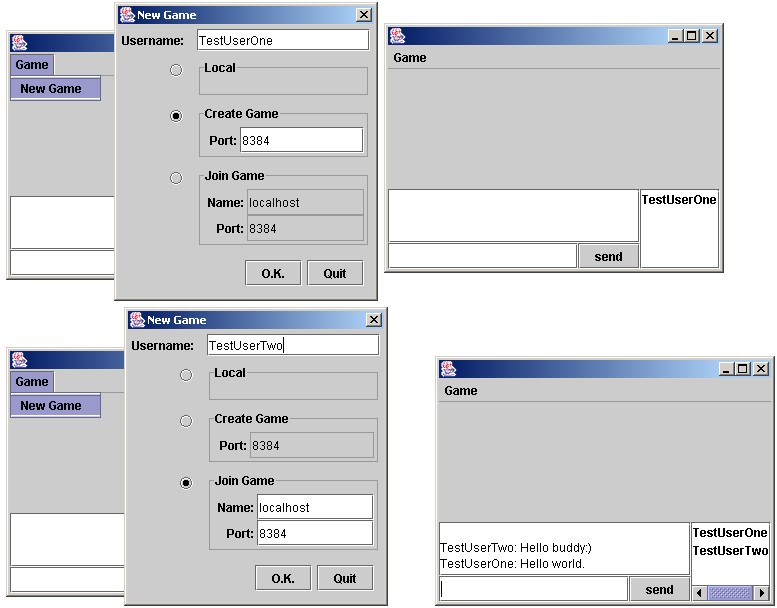
12: This class extends net.mlw.gfw.client.DefaultClient . See the javadoc or xref documentaton to see the details of what this class does. 14-16: A menu is created. This menu contains Game New Game 18: The init(final ClientContext clientContext) method is the one abstract method that needs to be implemented. This method is called by the parents initialize(final ClientContext clientContext) method. 20: The JMenu is added to the DefaultClient which extends a JFrame. 21-23: The JMenu that was created on line 14 does nothing unless you add an ActionListener. The GameFramework has many ActionListener(s) available for use. One such ActionListener is the NewGameActionListener . Adding this ActionListener to the menuFileNewGame MenuItem will show the new server dialog when the item is clicked. 26: The public static void main(String[ ] args) method that is called from the command line. 28: I call JPopupMenu.setDefaultLightWeightPopupEnabled(false); which allows the AWT light-weight and the Swing heavy-weight components to get along ( javaalmanac ). 29: Create a new instance of this class. Remember this class extends net.mlw.gfw.client.DefaultClient . 30: Call the initialize method. This is required to enable the net.mlw.gfw.client.DefaultClient#61 to register all the listeners and componets. 31-33: Some standard Swing setup to view the JFrame. Below is a screenshot of the results of running the above Sample. If you want to try it out yourself click on Java Web Start .
Congratulations you just made you fist networkable game using the GameFramework APIs. |
 GameFramework on Sourceforge
 Tutorial
 Project Info